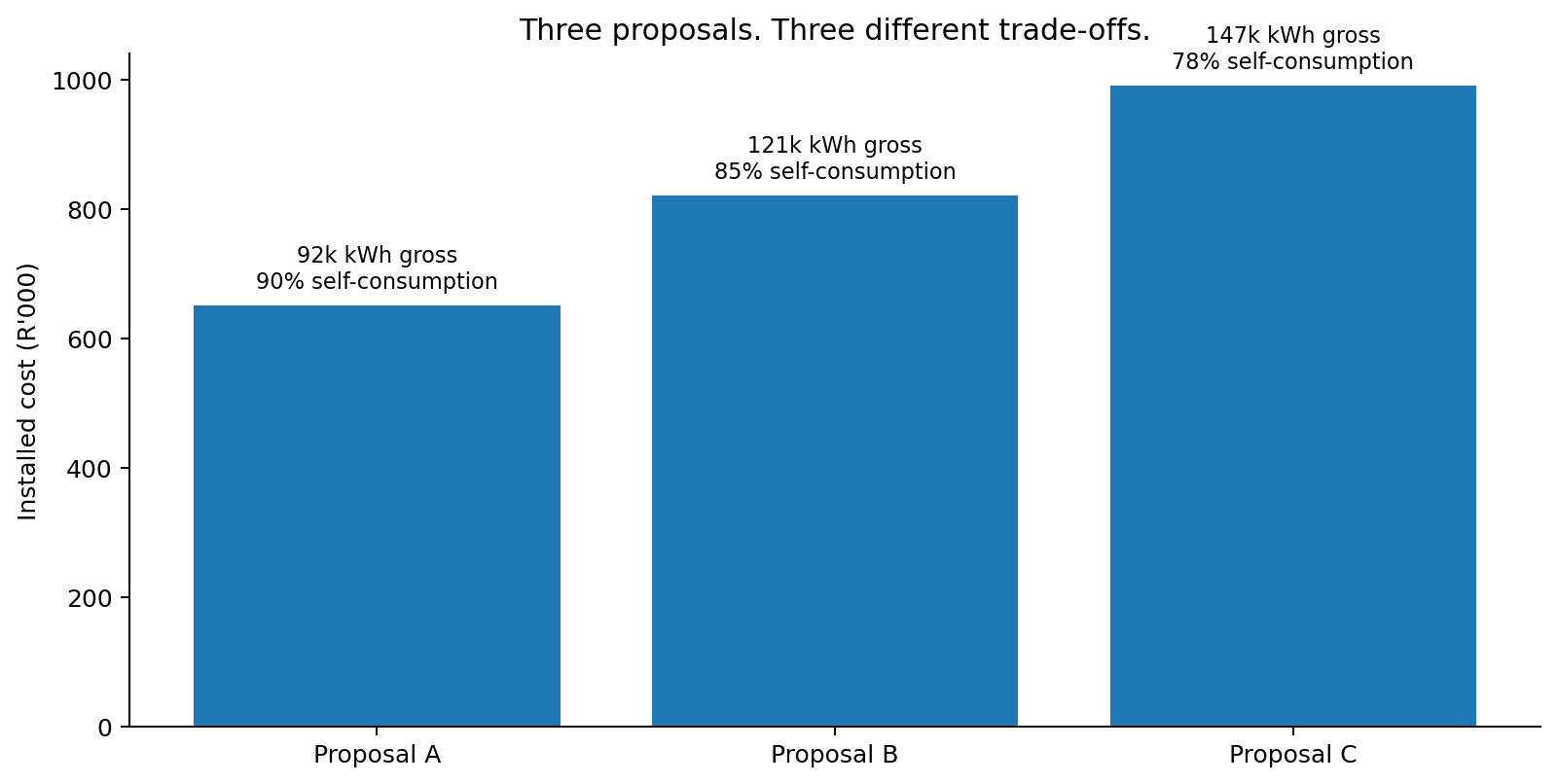
Which measure would you inspect first if you had to advise the Financial Director?
Your choice is saved automatically on this device. You will revisit it on Reflect.
Purpose → Outcome → Evidence
Purpose of this stage: establish the commercial meaning of the supplier data before using the spreadsheet.
Outcome for this stage: After completing this stage, you should be able to interpret the case data and explain how self-consumption affects the economic value of solar generation.
You will demonstrate this by: distinguishing installed capacity, gross generation and useful generation; identifying the case assumptions; and explaining why a larger system is not automatically the better investment.
Evidence: your prediction response and concept-check explanation.
Story so far: You have accepted the brief. Before calculating, you need to understand what the supplier numbers mean.
The case · The proposals arrive
Price is only one part of the decision
A larger PV system can generate more electricity, but Cape Manufacturing only saves money on solar electricity it can use when it is produced. This makes self-consumption the bridge between technical output and economic value.
If a system generates 100 kWh while the factory can use only 80 kWh, its self-consumption is 80%. In this simplified case, unused generation has no economic value.
Proposal
A
B
C
Installed cost
R650,000
R820,000
R990,000
System size
60 kWp
80 kWp
100 kWp
Year-1 generation
92,000 kWh
121,000 kWh
147,000 kWh
Self-consumption
90%
85%
78%
Year-1 maintenance
R9,000
R11,000
R14,000
Excel instruction · read cells, do not calculate yet
Use the Case Data sheet as your source of truth
Click the Case Data sheet.
Economic assumptions are in A3:E9. Click B4: the Formula Bar should show 2.8, the tariff in R/kWh.
Proposal inputs are in A12:F17. System A is column B, B is C, C is D.
Click D15 (147,000 kWh) and then D16 (78%). Note that the cell address changes in the Name Box.
Useful habit: never retype an input elsewhere if a formula can reference the original cell. This improves auditability and reduces inconsistent assumptions.
Formative checkpoint · prediction before calculation
If you had only 30 seconds, which metric would you look at first: Installed Cost, Size, Gross Generation, Annual Saving, or Payback?
Write down your choice and one reason. You will revisit it at the end.
NoteFormative feedback · concept check: which system generates most, and which has highest self-consumption?
System C has the highest gross generation (147,000 kWh). System A has the highest self-consumption (90%). Those facts do not, by themselves, identify the best investment.
Excel + Google Sheets · same task
Excel Use the sheet tabs at the bottom. Click a cell and read its address in the Name Box; read/edit the formula in the Formula Bar.
Google Sheets Use the sheet tabs at the bottom. Click a cell and read its address in the Name box at the left of the formula bar; read/edit the formula in the formula bar.
For this page there is no platform-specific calculation. The cell references Case Data!B4, D15 and D16 mean the same thing in both.
Next: learn the few Excel moves needed to build the model confidently.